

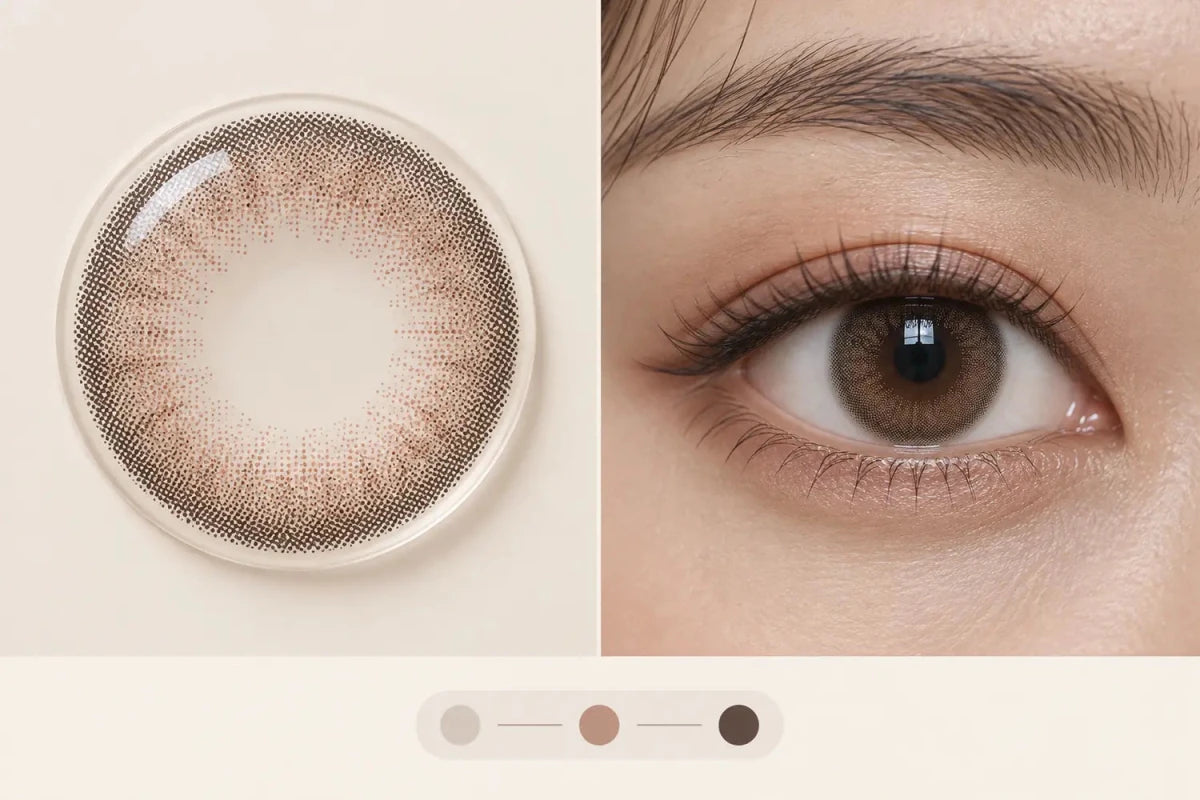
Before customers choose power, show a straight-on image of the exact lens lying flat beside a neutral-light close-up of that same version worn on an eye. The flat image reveals the printed dots, clear pupil zone, center gradient and outer edge; the on-eye image shows how those elements blend with a natural iris. Neither image should be substituted with another shade, replacement schedule or regular/toric version.
In this guide

The best primary image pair
Use two coordinated images near the start of the gallery: an isolated flat-lens view and a realistic on-eye close-up. Both must represent the exact product version named on the page. Keep their color treatment neutral enough that a shopper can compare the print with the worn result.
This pair answers two different questions. The flat lens shows what was manufactured as a visual pattern. The on-eye photo shows one possible interaction with a natural iris under stated or visually neutral lighting. A campaign portrait can follow for styling inspiration, but it should not be the only evidence before option selection.
What the flat-lens image proves
A useful flat-lens photograph is centered, straight-on and large enough to inspect without excessive zoom. It should reveal:
- the shape and density of printed dots;
- the clear central zone;
- the direction and softness of the center gradient;
- the presence, width and color of an outer ring;
- asymmetric artwork or orientation-dependent details when present.
A lens photographed at a steep angle can show curvature but distort ring width and graphic proportions. Use that view as a secondary material image, not the main pattern reference. Avoid placing the lens over a colored background that shifts the pigment.
What the on-eye image adds
The on-eye image should state or make clear the starting eye color and use neutral light. Show the entire iris, pupil transition and outer edge. A dark-eye example is especially useful for translucent colors because the natural base remains part of the visible result.
Add a full-face image after the close-up to show normal viewing distance. A pattern that looks bold in a macro crop may appear subtle in conversation. When useful, include one indoor and one daylight image, but avoid repeating nearly identical portraits that make the page longer without adding evidence.
| Image | Primary job | Limitation |
|---|---|---|
| Flat lens, straight-on | Shows print structure | Cannot predict the final eye color |
| Neutral-light eye close-up | Shows one realistic blend | Individual results vary |
| Full-face portrait | Shows strength at normal distance | Hides fine pattern detail |
| Packaging image | Confirms exact product/version | Does not show visual effect |
Images that should not carry the proof
Do not rely on an illustration, swatch, heavily filtered portrait or magnified eye image with unclear product identity. A photo from the regular spherical version does not prove the toric version’s print. A Daily version does not automatically prove a Monthly version. If the same image is intentionally shared, disclose exactly what it represents.
Generated editorial artwork can explain how to compare images, as it does in this guide, but it must be labeled. It should never be presented as a photograph of a specific product, a controlled wear test or guaranteed customer result.
Place the visual evidence before power selection
On desktop, keep the main image and purchase information visible together. On mobile, place the essential flat-lens and on-eye images early in the gallery, then show the exact version summary before prescription selectors. Do not make customers complete multiple fields before learning what pattern they are selecting.
- Confirm the product title and photographed version match.
- Inspect the flat print for center, ring and density.
- Compare an on-eye photo with a similar starting iris.
- Check the full-face result and more than one light when available.
- Then confirm the exact prescribed model and complete options.
Related categories
Compare visual structures through No Black Rim Contacts, Colored Contacts for Dark Eyes and Toric Contacts. The links stay grouped and left-aligned so they are easy to scan without spreading across the page.
Questions and answers
Is a model portrait enough to show the lens pattern?
No. Pair it with a straight-on flat-lens image and a clear on-eye close-up of the exact version.
Should the flat lens be photographed in a bowl shape?
A curved view can be secondary. The primary pattern image should be straight-on so the print proportions remain readable.
Can the same image represent Daily and Monthly versions?
Only when it truly represents both and the page explains that clearly. Do not imply identical specifications or print without verification.
Why show a dark-eye example?
It helps shoppers judge how a translucent print may blend with a dark natural base, although it cannot guarantee another person’s result.
Should product images appear before prescription selectors on mobile?
The essential pattern evidence should. Customers should understand the exact design before choosing order options.
Can AI artwork be used as product proof?
No. It can explain a comparison concept when labeled, but it must not be presented as a real product photograph or wear test.
Reviewed September 14, 2026 by the KPOP2 Editorial Team. This guide explains product-image hierarchy. Exact product images, versions and specifications must be verified on the current product page. Generated artwork is labeled as an AI editorial illustration.


