

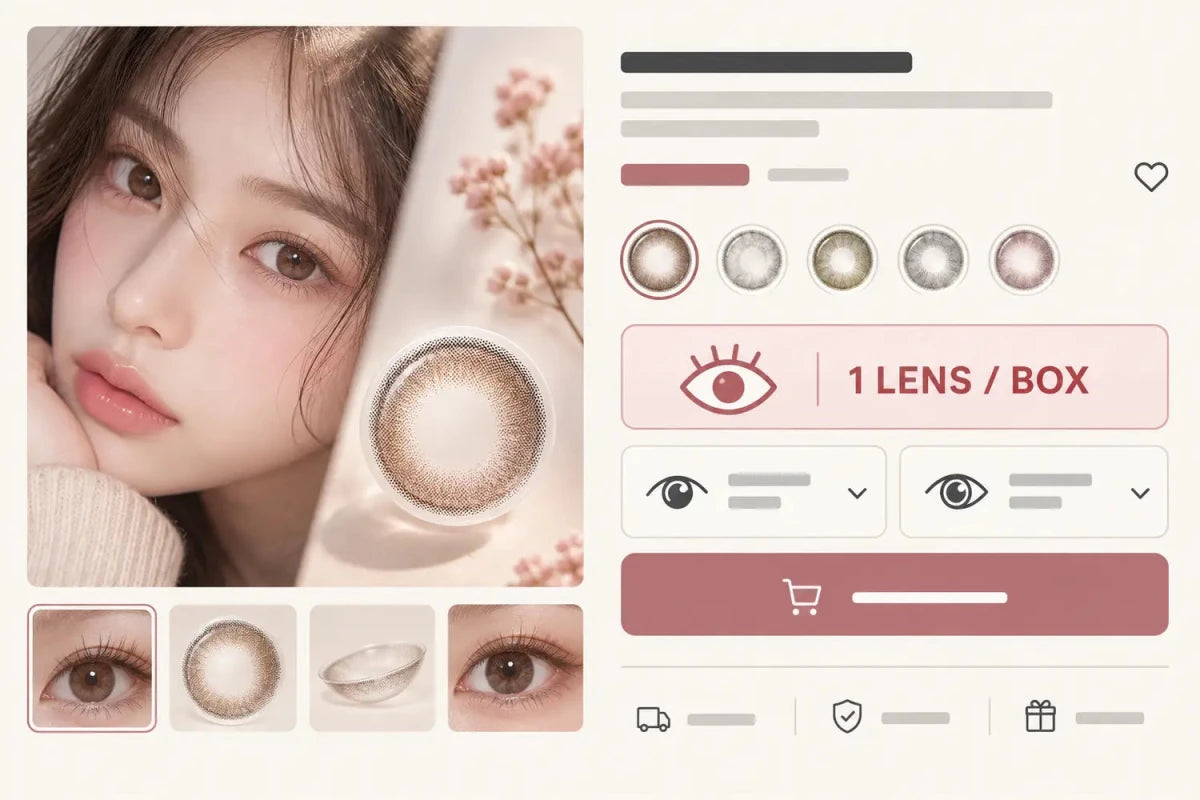
A colored-contact product page should explain whether one box covers one eye or both eyes in two places: beside the replacement schedule and pack count near the price, and again immediately above the left/right selections and Add to Cart button. The customer must understand the selling unit before choosing powers or quantity. Specifications can repeat the information, but they should not be its only location.
In this guide

Show the selling unit in the first product summary
Place the replacement schedule and pack count in the first information group under the product name and price. A compact line such as Monthly · 1 lens / box or Daily · 10 lenses / box answers two different questions without adding a tall content block.
Do not write “1 box” when the important fact is the number of individual lenses inside it. A box is packaging. The customer needs to know whether the selected quantity contains one lens, a pair, or a larger supply. The page should also avoid using “pair” unless the product actually supplies two lenses in the required configurations.
Repeat the fact at the decision point
The strongest second location is directly above the prescription selectors or quantity control. This is where a shopper decides whether to configure one eye, configure both eyes, or increase the box quantity. A short message prevents them from reaching the cart with the wrong assumption.
For a one-lens box, the interface can state: One box contains one individual lens. If both eyes need lenses, configure and add the required box for each eye. The page should not automatically assume that the right and left prescriptions differ, and it should not imply that one box covers both eyes.
If a promotion has paid and free selections, repeat the individual lens count beside both. The free item is another selling unit, not an automatic “other-eye” box. Its exact configuration must remain visible before confirmation.
Write the message literally
| Unclear label | Clearer label | Why it helps |
|---|---|---|
| 1p | 1 individual lens / box | Explains the unit without decoding “p” |
| 2p | 2 individual lenses / box | Avoids promising two powers in one box |
| One month | Monthly replacement · lens count shown separately | Separates schedule from quantity |
| Buy 1 Get 1 | Paid box + promotional box, each configured separately | Clarifies the promotion’s units |
Icons can support the message but should not replace it. A single-eye icon may be misunderstood without text. Use the same words on the collection card, Quick Add, product page and cart so the customer does not have to learn four versions of the rule.
Connect pack count to the quantity selector
When the shopper changes quantity, show what the number represents. “Quantity 2” should be readable as two boxes and the total number of individual lenses should update or remain clearly inferable. If different configurations require separate cart lines, the interface should explain that before the customer presses Add to Cart.
An estimated supply line can help, but it must show its assumptions. Ten daily lenses provide five two-eye wearing days only when both eyes use lenses from that supply and the box configuration supports the order. Two monthly lenses do not automatically cover two different powers. Calculate each eye separately when configurations differ.
Desktop and mobile placement
On desktop, keep the pack summary close to the price and place the repeated explanation within the purchase column. Do not stretch a short sentence across the full page width. On mobile, show the same summary before the first selector and repeat the exact version in any sticky Add to Cart bar.
Avoid pushing the explanation into a closed Specifications accordion below related products. The page can remain compact by using a one-line summary and a short decision-point note. Generous touch targets are useful, but the label and value should stay visually connected without large empty vertical gaps.
Before launch, test a one-lens monthly box, a two-lens box, a daily multi-pack, different left/right powers and a Buy 1 Get 1 flow. Confirm that product page, Quick Add and cart all preserve the same pack meaning.
Related categories
Check real selling units across Monthly Contacts, Daily Contacts and Toric Contacts. These grouped links support a quick comparison without creating a long navigation column.
Questions and answers
Is “1 piece / box” the same as one pair?
No. It means one individual lens. A pair contains two lenses.
Should pack count appear before Add to Cart?
Yes. It should be visible before the shopper chooses quantity or confirms the purchase.
Can Specifications be the only place that explains box contents?
No. Specifications can repeat the fact, but the main purchase area must show it at a glance.
Does a two-lens box contain two different powers?
Not automatically. Confirm whether one box contains a single configuration and calculate each eye separately.
Does a free promotional box automatically cover the other eye?
No. The free box’s exact configuration and intended eye must be selected and checked.
What should the cart line show?
It should preserve the exact product version, replacement schedule, individual lenses per box, selected configuration and box quantity.
Reviewed September 14, 2026 by the KPOP2 Editorial Team. This article explains ecommerce information placement. Product-specific pack contents, prescription options and promotions must be confirmed on the current product page. Generated artwork is labeled as an AI editorial illustration.


